Deploy history and rollback
Deploys lists every deploy of an app, newest first, and is where you go back to an earlier one.
Who can use it: the Builder role or higher.
The history
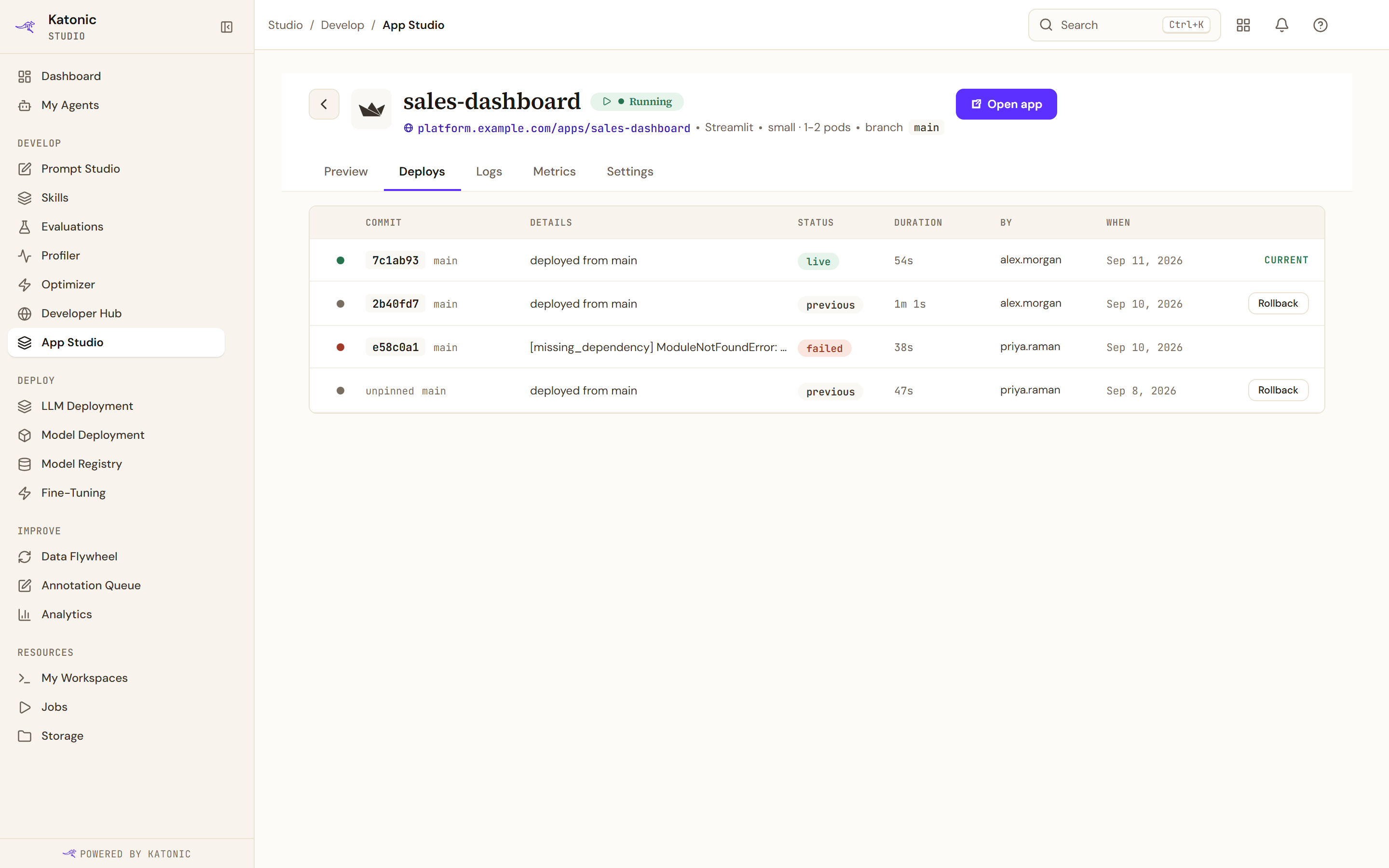
Each row carries the commit, what the deploy was, its status, how long it took, who shipped it and when. The current one is marked. The list holds the fifty most recent; older history is available through the API.
The status pill on the current row is reconciled against the app's live runtime status rather than being forced to live, so a deploy whose pods later crashed or never became ready does not keep a green pill. It reads live while the app is running, building while it starts, degraded where pods are not becoming ready, and failed where it crashed or the build did not finish. Earlier rows keep their own build outcome, and a build you stopped yourself reads cancelled rather than failed, because an abort is not a failure.
A failed row says why. A container that exits as soon as it starts reads, for example, "The container exited with code 3." with its last error line after it when there is one, and a reason such as "(OOMKilled)" can follow the code; the build view shows the same text. Fix the start command or the code that line names.
A row still building after 30 minutes reads "Build timed out after 30 minutes" when its app is stopped or failed, when a newer deploy has superseded it, or when its app no longer exists. A slow start on an app that is running is not timed out. Redeploy to try again.
Pinned against unpinned
The commit column is the one to read.
A row showing a short commit is pinned. The platform recorded the exact commit that deploy resolved, and a pod restart resolves that same commit again rather than drifting to whatever the branch points at now. That is what makes the deploy repeatable.
A row reading unpinned predates commit pinning. One more deploy records a pin. The column never shows an internal identifier dressed up as a commit, so if it does not look like a commit, it is not one.
This matters beyond tidiness. Rollback is refused where the source was never snapshotted, which is the case for a deploy made before pinning, and promotion is refused for the same reason.
Roll back
Rollback on an earlier row opens a dialog headed with the version you are leaving and the one you are going to. It does three things the plain confirmation would not.
It compares. Two columns, CURRENT · LIVE against ROLLBACK TARGET, so you can see what actually differs before you commit to it.
It states the impact. An IMPACT block names, from live data:
- how many viewers are currently on the app, and that they will see no interruption;
- how many errors in the last 24 hours will revert, with the warning that the root cause may not be in this diff;
- that the rollout is zero downtime, the old container draining as the new one boots;
- that a health check runs at the end of the rollout.
The errors line is the one worth pausing on. It tells you what reverting removes, not that reverting fixes it.
It asks you to acknowledge. A checkbox states in words that this redeploys the named version or rebuilds from the named commit, and that the current build will be marked rolled back. The action button reads Rollback now with a rough duration beside it.
Where the target has deploy logs, the dialog offers View deploy logs first.
What rollback actually does
It creates a new deploy from the target's source snapshot rather than resurrecting the old one. The current deploy stays in the history marked rolled back, so nothing disappears, and the history keeps reading forward in time.
Because it is a new deploy, it goes through the normal path. It is usually fast, since the source is already known.