The Python SDK
The Python SDK wraps the public API in one async client, KatonicClient, with a typed method per call, and ships the katonic command for the same calls from a terminal. Use it when you write Python against the platform and would rather call list_agents() than build requests by hand. This page describes the version published on PyPI, which is 7.0.18.
Who can use it: anyone with a kapi_ API key from the Developer Hub, in a tenant licensed for the public API. Each method needs the matching scope on the key.
Install
pip install "katonic-sdk>=7"
The package is katonic-sdk on PyPI and you import it as katonic. Version 7.0.18, released on 1 October 2026, is the first and only 7.x release so far. It needs Python 3.11 or newer. An agent's Code lens in Studio lists the same katonic-sdk>=7 in its requirements.txt.
Keep the >=7 in the line. The releases numbered 6.x under the same name are Katonic's legacy MLOps SDK, a different API, and the pin makes sure pip never resolves to one of them. The legacy katonic package, version 6.2.0, also imports as katonic; installing it beside this SDK in one environment is a silent module collision, so keep them in separate environments.
On Python 3.10 the install fails with "No matching distribution found", because no 7.x release supports it. That includes the Spark workspace images. Use an image or environment with Python 3.11 or newer.
Base URL and API key
The client reads two environment variables, or takes the same values as api_key= and base_url= arguments:
export KATONIC_BASE_URL=https://<your-studio-host>
export KATONIC_API_KEY=kapi_...
- The base URL is the address you open Studio at, with no path. The client adds
/public/v1itself. The Developer Hub's header shows it as the SDK base URL chip, with the address you are browsing. On AI Cloud that is your organisation's own Studio host. - The key comes from API keys in the Developer Hub. It acts as the user who created it, in that user's tenant. A Builder's key cannot hold
models:readorusage:read:models:readcomes with the Operator, Release Approver or Model Risk Approver grant, andusage:readwith the Auditor grant. See Authentication for the scopes.
Without a key, creating the client raises a ValueError that names the missing setting.
A first call
import asyncio
from katonic import KatonicClient

async def main():
    async with KatonicClient() as k:
        agent = (await k.list_agents())[0]
        resp = await k.chat(agent.id, "What is the leave policy?")
        print(resp.message.content)

asyncio.run(main())  # in a notebook cell, use: await main()
chat() takes the agent's id, not its name or slug. The Developer Hub's SDK & snippets tab has the same shape with an <agent-id> placeholder, and an evaluation example that uses the ev-llm-judge evaluator. In a notebook the kernel's event loop is already running, so asyncio.run() fails there; end the cell with await main() instead.
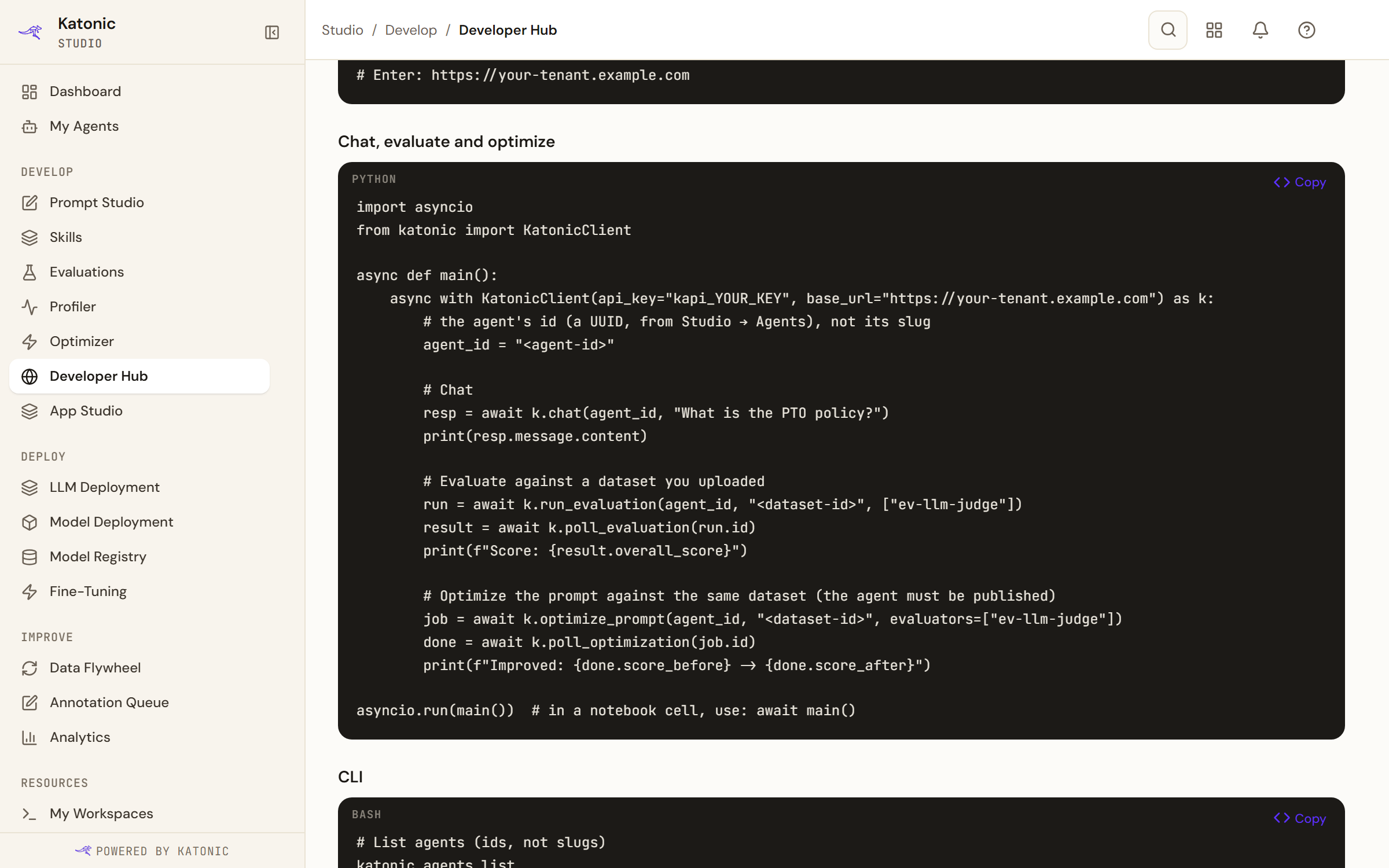
An HTTP error raises KatonicAPIError, which carries status_code and detail. A tool call that the platform refuses or that fails inside a successful response raises ToolExecutionError.
SDK methods and the katonic command lists what the client covers.
Known gaps in 7.0.18
These are fixed in a later release that is not published yet. Until then, work around them:
| Gap | What to do |
|---|---|
chat(..., stream=True) fails with a JSON decode error, because the method reads the streamed reply as one JSON body. | Leave stream at its default. For a streamed reply use chat_stream(), which yields events. |
A base URL ending in /public/v1 does not work: the client appends the path again. | Use the bare Studio address. |
katonic tools exec needs the MCP server's name and then the tool name: katonic tools exec <server> <tool> '<json>'. Passing only the tool name sends the arguments as the tool's name. | Pass both names. |
katonic eval run always waits for the run to finish; there is no --no-wait, and there is no eval local command. | Start the run from Python with run_evaluation() and poll it yourself when you do not want to wait. |
python -m katonic does not run the command. | Run katonic directly. |
7.0.18 already reads a completion with an empty finish reason, no usage block or a message with no text content, and a usage report with no cost, without raising. A cost the platform cannot price comes back as None, not 0.
Examples
The SDK's source has two example scripts that are not in the installed package. One calls every client method against a live platform and prints each step as PASS, REFUSED, SKIP or FAIL; the other covers the offline authoring modules and needs no platform. Ask your administrator or Katonic for them.