Query a graph in the explorer
Explore is the domain graph as a table. Where the canvas is for following connections, the explorer is for answering "which of these have that property", and for reading the values rather than the shape.
Who can use it: the Builder role, or a Member holding the Knowledge Admin grant.
Filter an entity type
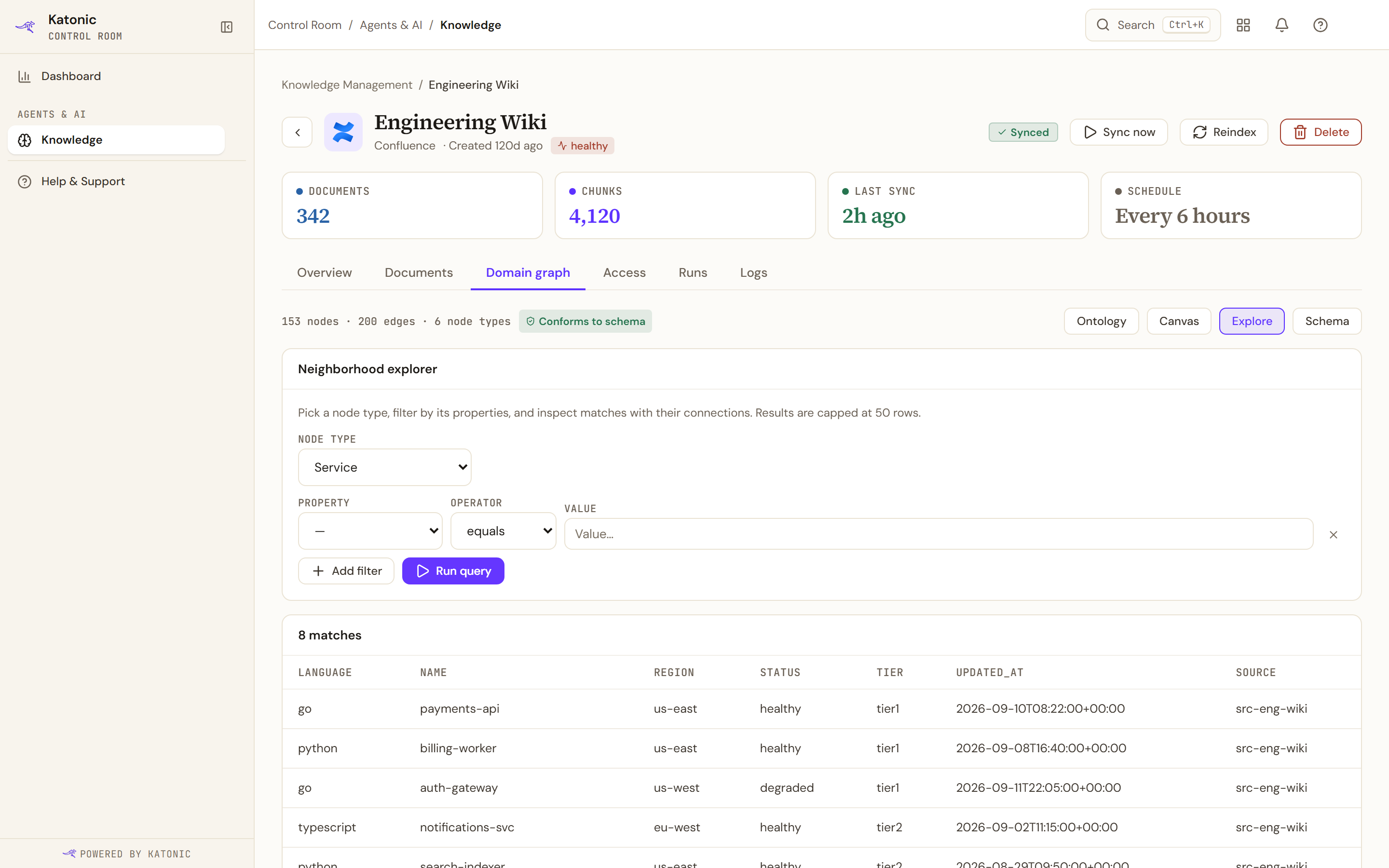
Open it from an entity type's Explore on the Ontology view, or from the view switcher.
A filter is a property, an operator and a value. The operators are equals, any of, contains, at least and at most, so a text property and a numeric one are both usable.
The table columns are the properties the entities actually carry, up to eight of them, plus Source, which names the knowledge source each row came from.
A query returns at most 50 rows, and the hint above the form says so. It is a sample you can steer, not an export: to take the data away, use the canvas's export.
One entity's neighbourhood
Selecting a row draws that entity and what it connects to, up to a couple of dozen neighbours. It is a quick look rather than the canvas: to keep following the connections outward, open the entity on the canvas instead.
Limits and behaviour
- The explorer asks for 50 rows. The graph service's own ceiling is three hops and 200 rows per query, which is what the canvas works within.
- The table shows up to eight property columns. An entity type with more properties than that is still complete in the inspector on the canvas.
- A neighbourhood draws a limited number of neighbours, so a heavily connected entity is shown partially by design.