An agent's page
Agents
An agent's page is where it is watched, changed and shipped. Everything on it is read-only except publishing: editing happens in the builder, and the page's Edit takes you there with a draft made from what is live.
Who can use it: the Builder role or higher. Editing and publishing need you to own the agent or hold the administrator band.
Recorded on .
- Header
The header: the name, the version it is on, its Live status, the model tier, tools and knowledge, channel, owner and dates. Everything on the page is read-only except publishing; editing happens in the builder. Overview reads the last seven days: conversations, CSAT, tool success, latency and spend, then the top tools, the classification mix and health.
- Actions
Three actions. Edit makes a draft from the published version. Publish is named for the draft that exists, here v3. The menu holds Duplicate, Archive and Delete. Edit asks first. The draft is seeded with the published prompt, tools and knowledge, and you land in the builder to change it and publish again.
- Publish
Publish v3 opens Promote v3 to live. It says exactly what happens: v3 becomes the live version, v2 is archived and can be restored from Versions. Tick the acknowledgement, and promote. Where your tenant uses lanes, the dialog names the lane instead.
- Versions
Versions: a row per version with its author, when it was drafted, what changed, its evaluation score and cost against the version before, and the actions that apply. v2 is live. v3 is the draft, ready to publish or discard. v1 is the initial version, and Diff compares any row with the one before it. Roll back re-points the agent at an earlier version. Nothing is archived: the version you step off stays in the list and can be published again. Picking a version newer than the live one is not a rollback: it files a promotion request instead.
- The tabs
The tabs cover the rest. Traces lists every conversation with its judge score, latency and cost; Flagged, Escalated and Tool fail narrow it to the ones worth reading. Governance shows what is enforced: the guardrail profile bound to it, the policy behind each tool, and the audit trail. And Playground talks to the live agent, with the run inspector beside it: model, tokens, latency and cost for the turn.
The header
The name, a badge if the agent is one the platform ships, the version it is on, and a status pill. Under it, the model, tools, channel, owner and dates.
The status pill can read Live, In review, Draft, Paused, Archived, or a canary with a percentage. Three of those the platform cannot currently produce: an agent is a draft, published, archived or disabled and nothing else. See My Agents.
The actions
Edit makes a draft from the published version and opens the right builder for the kind of agent it is.
Publish appears only when a draft exists, and is named for the draft's own version. When there is no draft there is no button, rather than a disabled one, because an earlier version guessed the version number and got it wrong.
Promote to production appears where a production lane exists. Where your organisation is provably sandbox-only it appears disabled and says why. Where there are no lanes at all it is absent, because that is a healthy state rather than a stuck one.
The menu holds Duplicate, Archive and Delete. For an agent the platform ships, those three are replaced by a note saying it cannot be archived or deleted.
Publishing
Publishing a draft does not necessarily make it live.
Where your tenant uses environment lanes, publishing puts the draft in the lowest lane, usually development, and the agent's live pointer only moves if this is the agent's very first publish. After that the version sits in that lane until it is promoted. The dialog names the lane it is going to.
Where lanes are not in use, publishing makes the version live.
Promoting
Promotion moves the version running in the sandbox lane to production. What happens next depends on a setting your organisation holds, and the dialog reports which it was rather than assuming: either the promotion was approved and the version is live in production, or it was requested and an administrator must approve it.
Versions
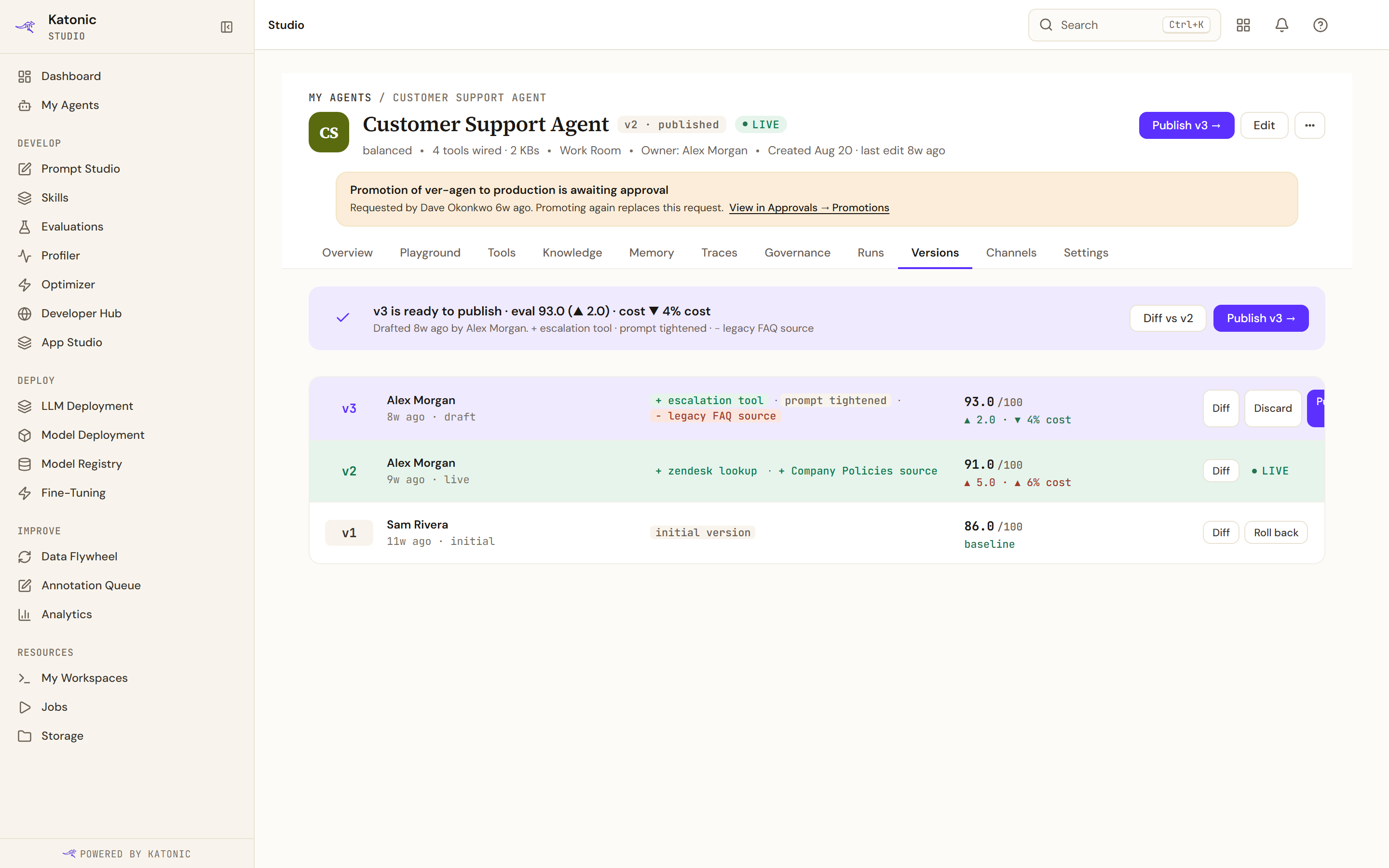
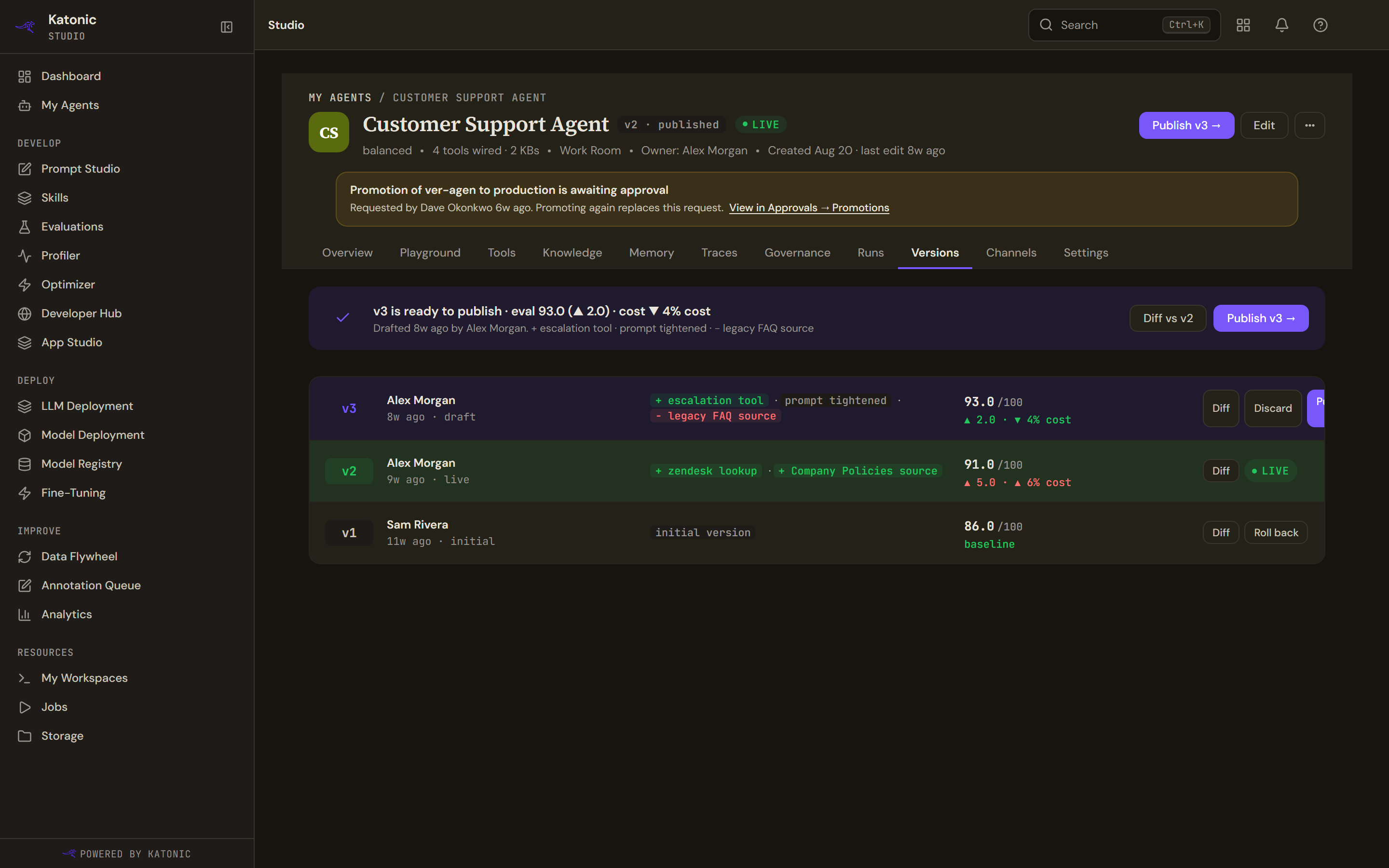
A row per version with its author, when it was drafted, a summary of what changed, its evaluation score and cost against the version before it, and the actions that apply.
A version's role is worked out from two facts: whether it is a draft, and whether it is the one being served. There is no lifecycle field behind it. A version numbered above the live one is marked as newer, which can mean a publish that has not been promoted or a rollback that stepped back; the page states the arithmetic rather than guessing the cause.
Diff compares a version with the one before it. The dialog shows the model tier, memory, temperature, maximum tokens and the counts of tools, knowledge bases and sub-agents, each marked the same or changed, then the two system prompts side by side and what was added, removed and kept.
Rolling back
Roll back re-points the agent at an earlier version. Nothing is archived: the version you stepped off stays where it is and can be published again.
Rolling back to a version newer than the live one is not a rollback, and the platform treats it as one: it files a promotion request instead. The dialog and the message afterwards both say which of the two happened, and say plainly when the answer could not be read rather than claiming success.
Rolling back needs the release right. Discarding a draft needs only the authoring right, because it is an authoring action.