Annotation Queue
Evaluations
The Annotation Queue is where a person judges answers the platform already judged badly. It is the only place in Studio where human judgement is captured as data rather than as a comment, and it is the source the flywheel trains from.
Who can use it: anyone who can open Studio, in a tenant licensed for evaluations. Acting on an item needs you to own the run it came from or hold the evaluations approval right.
Recorded on .
The queue in four steps
The video above walks the queue and the pane; the review page goes deeper on each action.
- Read the queue
The header counts what is done against the total; Pending, Completed, Skipped and Parked carry live counts, one per question, with an agent filter, a sort and a faithfulness checkbox beside them. Selecting a row loads it into the pane.
- Review an item
The pane shows the score and faithfulness, the run the item came from, the failure reason, the user's question and the agent's answer. The correction is free text. Submit correction publishes it as a training sample, Already correct asks first and publishes the agent's own answer at the judge's score, Skip publishes nothing, and Suggest with AI drafts a correction to edit.
- Revisit a finished item
A completed item keeps its context and shows the correction read-only; Reopen, on a completed, parked or skipped item, puts it back in the pending queue.
- Work through a batch
Bulk select turns the rows into checkboxes and a bar offers Mark as correct, Skip all and Clear for pending or skipped items; it is for a run where the judge was harsh, not for clearing a backlog unread. The keyboard covers it all:
jandkto move,ato approve,sto skip,bfor bulk.
What puts an item here
Two things, and only two.
An evaluation run finishes. Every sample whose average quality score falls below the flywheel threshold is added. The threshold is set per deployment and defaults to 0.6. A sample that only measurement evaluators looked at is skipped, because there is no quality score to be below anything.
Someone promotes a run's failures. A run's page has Send N to Annotation, which adds that run's failed samples. It will not add the same question twice for the same agent while an earlier copy is still pending.
Nothing samples production traffic at random, and there is no percentage to set. Everything here failed something.
What travels with an item
The worst-scoring evaluator's reasoning becomes the failure reason shown in red beside the agent's name. Where the run included the faithfulness evaluator, that score is carried across as a separate number. Where it did not, the item has no faithfulness at all, and an item without one is invisible to the faithfulness filter rather than treated as passing. The tag's absence is the only signal you get.
The queue
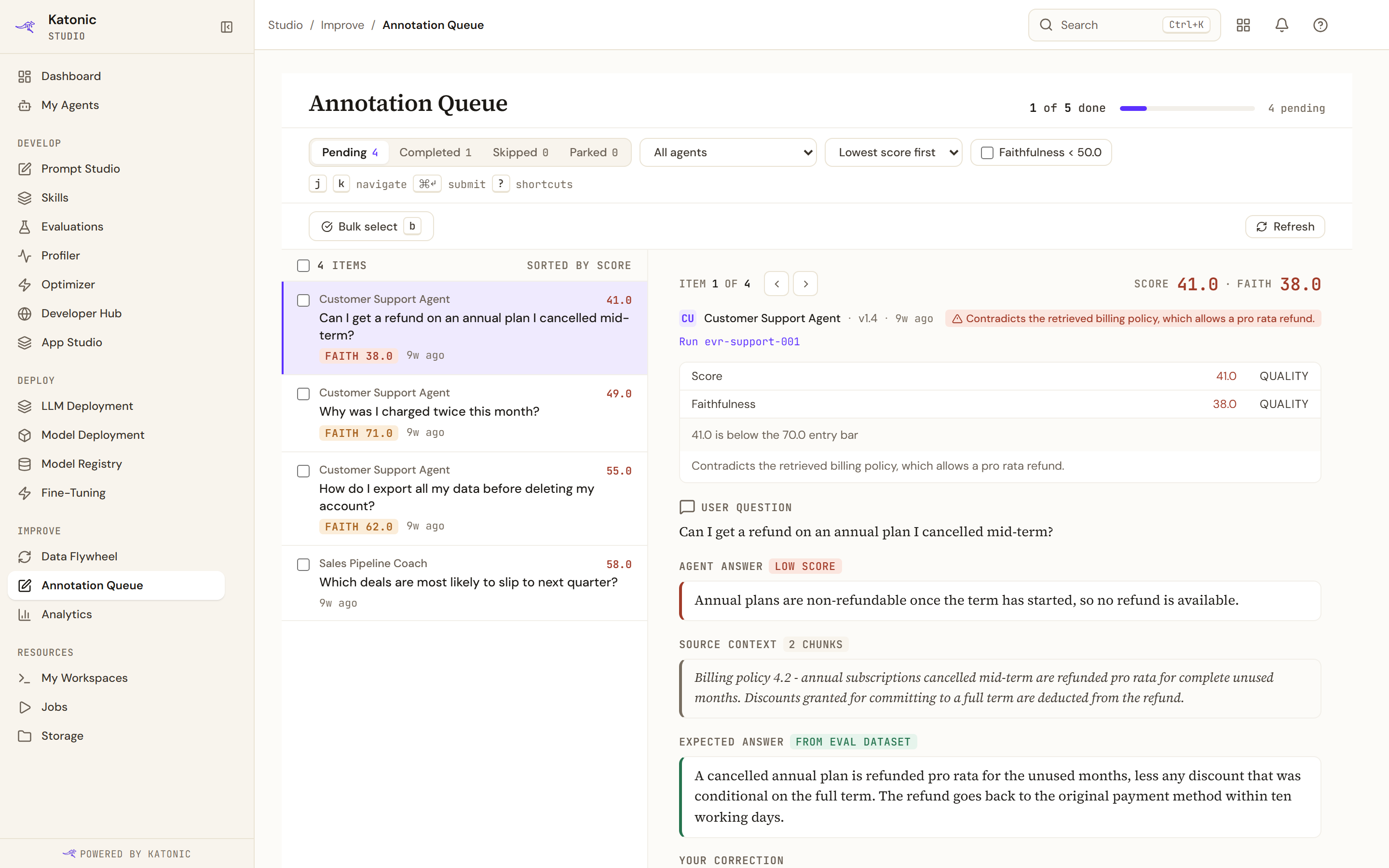
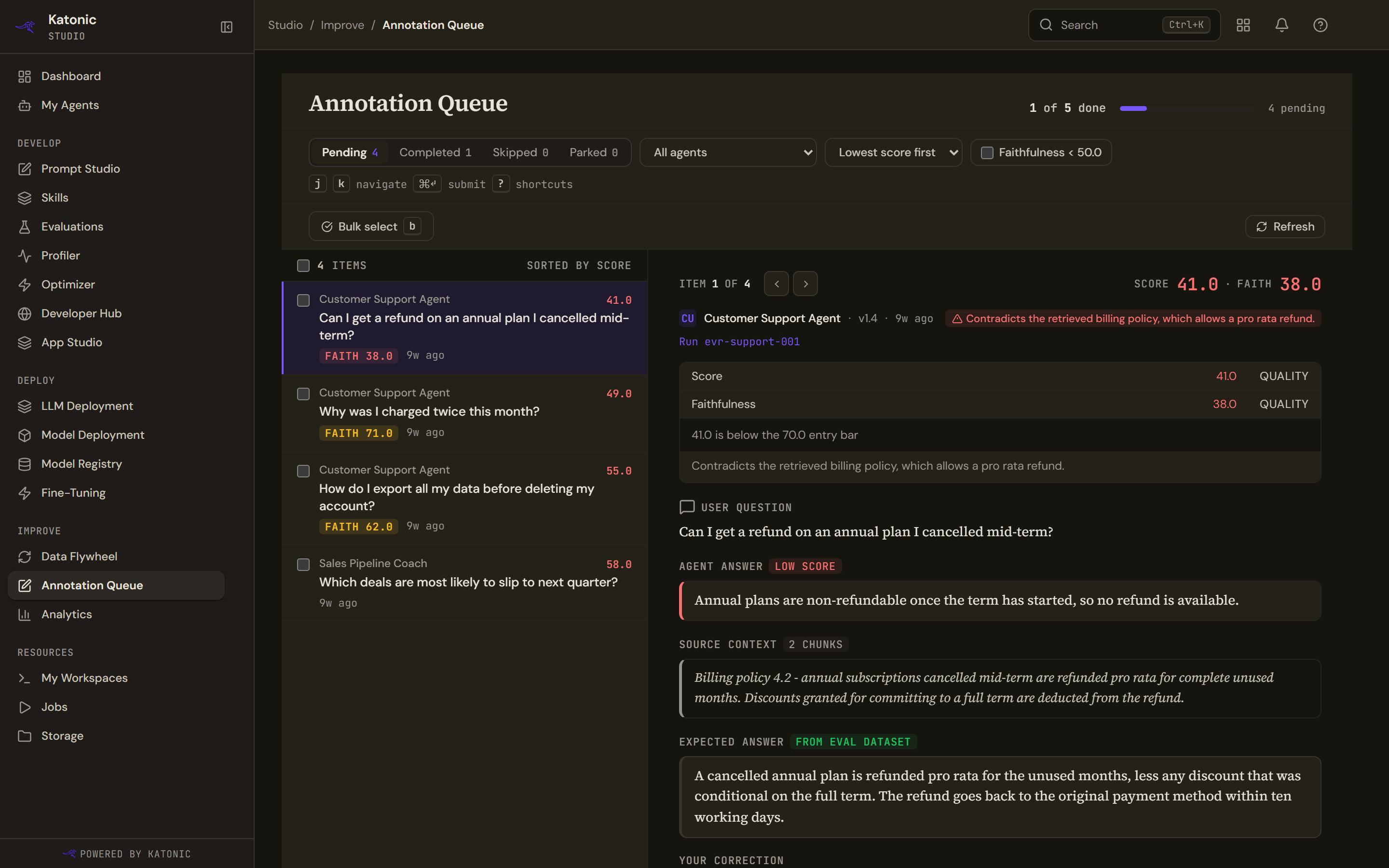
The header counts what is done against the total and shows a progress bar. With nothing pending it reads All caught up. There is no estimate of time left.
Pending, Completed, Skipped and Parked each carry a live count. Beside them sit an agent filter listing the agents actually present in the queue, a sort of Lowest score first or Newest first, and a checkbox for Faithfulness < 50.0, which keeps the items whose faithfulness falls below the fail threshold (50.0 by default; the queue shows every score on a 0 to 100 scale). The agent you pick stays picked after a reload or in a link you share, and the list still offers All agents and the others.
Counts are per question. A question asked in more than one run appears once, tagged "seen in N runs" (shown in capitals), and the tab badges, the header, every "N left" message and the Annotation queue card on the Studio Dashboard count it once. When you select it, the pane says your action applies to all its copies.
When a filter, the agent filter included, leaves a tab empty, the list says so: "No pending items match the filters." on Pending, and the same wording on the other tabs, such as "No completed items match the filters." With no filter and nothing pending, it reads "No pending items" and explains that evaluation runs fill the queue.
Each row gives the agent, the score to two decimals, the question, the faithfulness tag where there is one, and how long ago the item arrived. Selecting a row loads it into the pane on the right.
Where a correction goes
Saving an item writes the correction to the platform's database and, separately, publishes it as a training sample marked as coming from annotation. The second step is best effort: if the event bus is down the save still succeeds and the training sample is not published. Nothing in the queue tells you which happened.
From there a harvest job collects the samples into a flywheel round. That is the path from a bad answer to a changed agent, and it runs on its own schedule rather than on yours.
An item the agent errored on, or one carrying a platform diagnostic rather than an answer, cannot be marked correct at all: there is nothing there worth training on. Those have exits of their own, described in Review an item.
Who can act on an item
Everyone in the workspace who can open Studio sees the whole queue, including other people's pending items. Acting on one is narrower: you must be the person who created the evaluation run the item came from, or hold the evaluations approval right.
Every item names the owner of the run it came from, a completed one names who reviewed it, and where you are neither the owner nor an approver the actions are disabled with a note that only the run's owner or an evaluations approver can act on the item.
An item whose owner the platform cannot resolve, from a run with no creator or one recorded before the link existed, is not blocked in the browser. The service still decides, so a submission can be refused there.
What is not here
Items are not assigned to anyone. There is no claim, no reviewer step and no approval after the fact. The states are pending, completed, skipped and parked, and Reopen is the only way back.